Tool support requires the appropriate API integration; a supported tool is not automatically active in every chat.
Supported API features and tools
A 1,048,576-token context for organizing repository material, source documents and visual evidence
Always-on thinking with low, high and max reasoning effort; max is the documented default
Streaming with separate reasoning_content and final-answer content deltas
Strict JSON Schema for final content, partial-prefix continuation, custom tool calls and dynamic tool loading
Automatic prefix caching with five-minute or one-hour TTL options and separate cache-write charges
Provider-described improvements over K3 in coding, tool-assisted 3D creation and financial-document reasoning
Before you choose
The shared quickstart specifies a 131,072 default max_completion_tokens budget and a 1,048,576 request ceiling. Input plus completion must fit the context; the ceiling does not guarantee a million-token final answer or exclude reasoning from the budget.
Visual understanding returns text. Blender, CAD, spreadsheet editing and web research require external tools and an integration that executes them; this model alone is not an image, video or 3D-file generator.
Public image URLs are not supported by the documented vision workflow. Use supported base64 content or uploaded ms:// file references in a content array. App upload support is not established by this API capability.
Kimi’s quickstart says its web-search tooling is being updated and is not recommended for near-term production workflows. This is provider-tool guidance, not an assessment of EZ Ai Assist’s separate search feature.
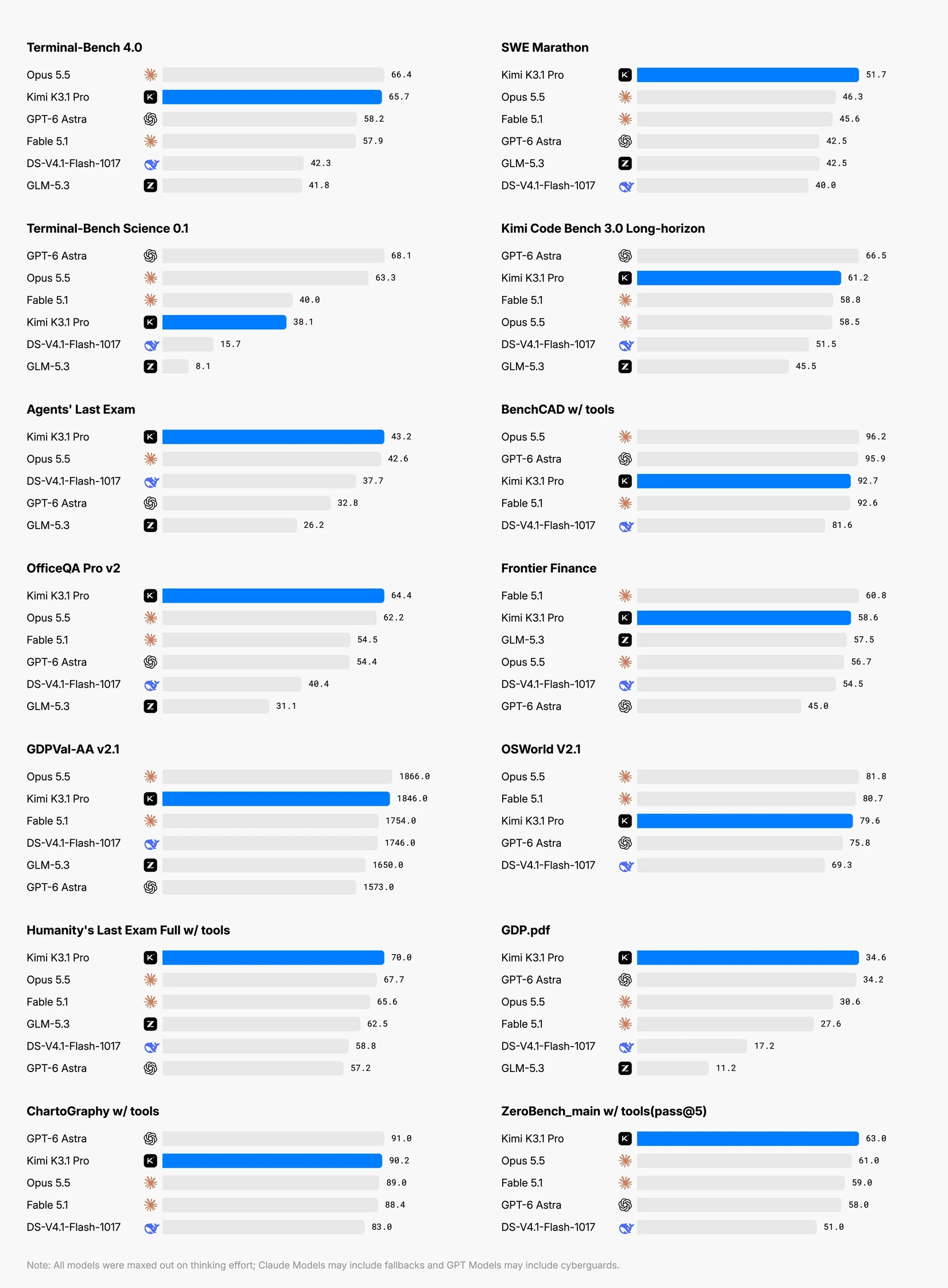
The supplied benchmarks are provider-reported and were not independently reproduced. Scores depend on tools, effort, task selection and evaluation setup; they do not guarantee performance in your workspace.
No verified knowledge-cutoff date is supplied. The October 24 documentation announces full weights for November 4; this guide does not claim they are already released or establish their eventual license.
Choose the reasoning effort
lowhighmax · default
Thinking cannot be disabled. Set the top-level reasoning_effort to low, high or max. Start with a bounded task and compare correctness, latency and billed usage across effort levels; lower effort reduces the reasoning budget rather than creating a non-thinking mode. The same-family High Speed variant changes serving speed, not the documented effort names.
Use the exact model ID kimi-k3.1-pro with the Kimi Chat Completions API. These are official provider IDs, not independently verified EZ Ai Assist upstream mappings.
Use max_completion_tokens for the completion budget. The current API reference says it automatically lowers the generation limit when input plus the requested budget exceeds the context window. Output usage includes reasoning and answer tokens. Preserve the complete returned assistant message, including reasoning and tool history, in later turns.
The documented sampling values are fixed: temperature 1.0, top_p 0.95, n 1 and both penalties 0. Omit unsupported adjustments rather than copying another provider’s generic request settings.
With strict JSON Schema, parse final message.content, not reasoning_content. Validate both schema and factual values. For tool calls, execute permitted actions separately and return a result for each matching tool_call_id.
Dynamic tools require a complete definition in the documented system-message form and must remain in subsequent history. Formula tools also require a client-side execution loop; declaring a tool does not execute it.
Automatic caching applies to eligible repeated prefixes. Five minutes is the default TTL; select 1h through prompt_cache_options.ttl when appropriate. A partial block is a cache miss, and a cache hit is not another cache-write billing event.
Direct Kimi API access requires a successful top-up, with tiers controlling rate limits. That provider-account requirement is not an EZ Ai Assist subscription or purchase instruction.
Provider-reported evidence
Read the benchmarks in context.
These are provider-reported K3.1 Pro results, not independently reproduced by EZ Ai Assist. They are not measurements of this app or separate High Speed evaluations. Compare task definitions, tool access and reasoning settings before drawing conclusions; a benchmark rank does not guarantee success on your work.
Benchmark overview
The chart spans coding, science, office, finance, visual and agentic tasks. Kimi’s footnote says models were tested at maximum thinking effort; Claude runs may include fallbacks and GPT runs may include cyberguards. Scores across different benchmarks are not directly comparable. Use the full-size version to read individual labels and the original footnote.Open full-size benchmark overview (new tab)Source: Kimi (new tab)
Terminal-Bench cost comparison
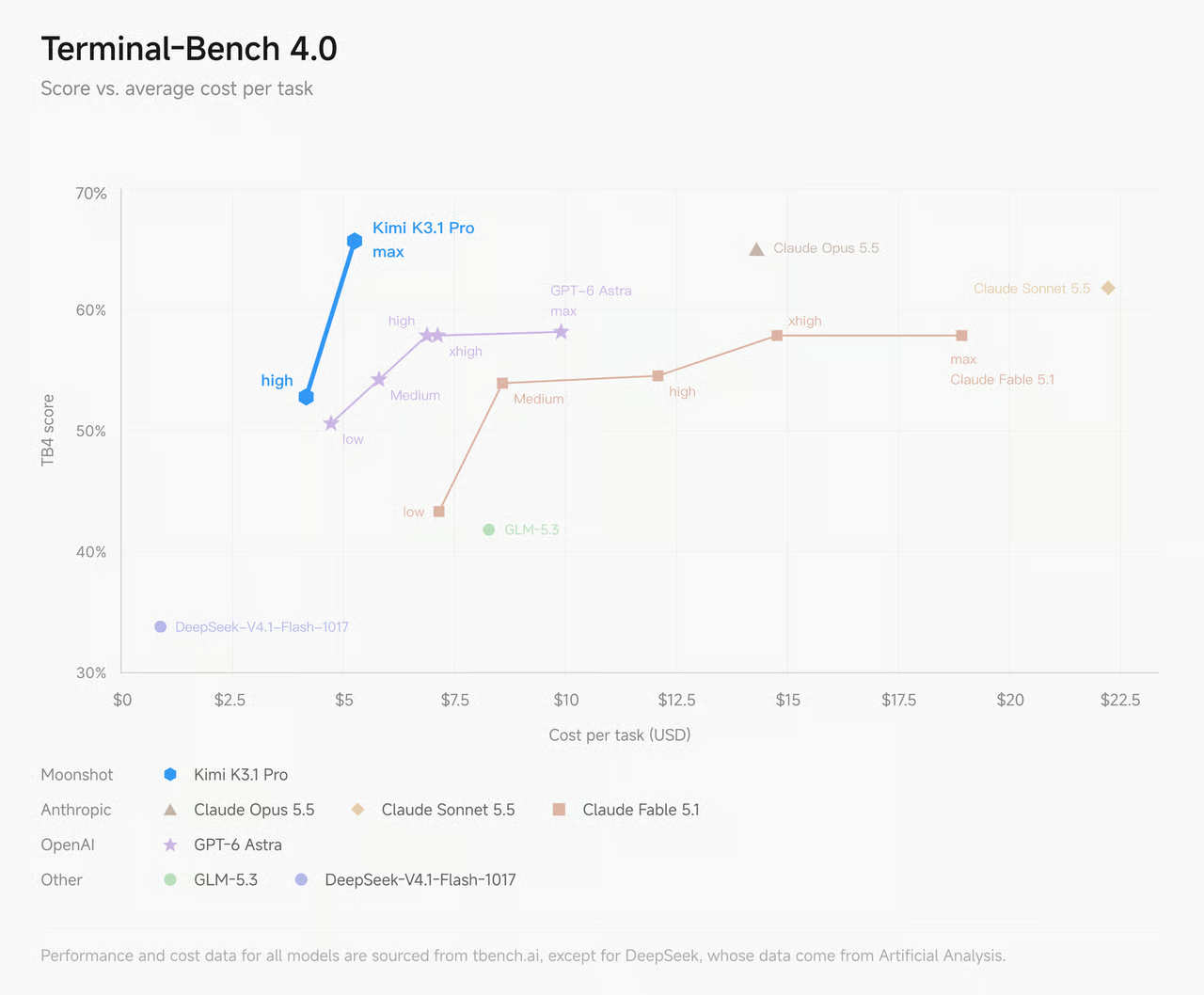
Provider-reported benchmark performance versus average evaluation cost per task. The chart attributes performance and cost data to tbench.ai, except DeepSeek data from Artificial Analysis, and plots several reasoning settings. These evaluation costs are not EZ Ai Assist customer charges, subscription rates or guaranteed costs for your tasks. Open the full-size chart to read the labels and source footnote.Open full-size terminal-bench cost comparison (new tab)Source: Kimi (new tab)
Put it to work
Start with a more useful prompt.
Original examples from EZ Ai Assist. Adapt these to your task and the features available in your workspace.
Workflow 01
Plan a sustained code change
Use a large context without losing review boundaries.
Using the repository map, code excerpts and requirements below, plan this cross-module change. Identify affected interfaces and cite the supplied files. Divide the work into small patches with an acceptance test and rollback checkpoint for each. Separate confirmed behavior from assumptions, preserve public contracts, and do not claim to inspect or execute anything beyond the supplied evidence.
Workflow 02
Reconcile financial documents
Make numerical conclusions traceable, not merely plausible.
Reconcile the figures in these supplied financial documents. Build a table of metric, period, unit, source and discrepancy. Show the arithmetic used to compare totals, distinguish reported values from derived calculations, and list missing assumptions. Do not offer investment advice or invent missing data. Finish with the checks a human reviewer must complete before using the analysis.
Workflow 03
Specify a parametric 3D asset
Separate a modeling plan from actual tool execution.
From this design brief and reference image, propose a parametric modeling plan for the asset. Specify dimensions, units, adjustable parameters, constraints and a component hierarchy. Identify ambiguous geometry instead of guessing. Suggest a Blender or CAD scripting approach and geometric validation checks, but do not claim to create, render or export a file unless the connected tools actually perform those actions.
Developer reference
Kimi API pricing
These are Kimi API reference prices, not EZ Ai Assist subscription prices or actual customer charges.
Kimi K3.1 Pro direct API reference · verified October 24, 2026 · USD per 1,000,000 tokens
Token type
Price
Input · cache miss
$2.00
Input · cache hit
$0.20
Output
$10.00
Cache write · 5-minute TTL
$2.00
Cache write · 1-hour TTL
$4.00
Verified against the rendered official pricing table on October 24, 2026. Rates are USD per million tokens, exclude applicable taxes and can change. Input and output are separate billing items; context length does not create a different price tier in the documented K3.1 Pro pricing.
Cache writes have separate five-minute and one-hour rates. Cached input receives the cache-hit rate without an additional write charge on that hit. Do not sum every row as though every token incurs every charge.
The High Speed variant has different input, output and cache-write rates. Compare its total usage and elapsed time against Pro on representative tasks; do not assume the faster endpoint is cheaper.
Common questions
A few things worth knowing.
How does Pro differ from High Speed?
Kimi describes High Speed as the same intelligence with about 2–3× the speed. It uses a distinct API ID and different reference rates. Treat that as provider positioning, not a guarantee of equal answers or fixed response times in every integration.
Can I turn thinking off?
No. The shared quickstart documents always-on thinking, with low, high and max reasoning effort and max as the default. Effort must be configured by the integration; mentioning a setting in a prompt does not prove an API field was sent.
Does 1M context mean a million-token answer?
No. The documented completion ceiling is a request budget shared with context, not a guaranteed final-answer length. Input, reasoning and other request constraints affect what remains for a response; the default completion budget is 131,072.
Can it produce a finished 3D scene or spreadsheet?
Its documented output is text. Kimi’s examples use tools and execution environments to produce artifacts. A chat response can propose code or instructions, but actual files require an integration that executes and validates the workflow.
Are the charts independent tests of EZ Ai Assist?
No. They are Kimi-published K3.1 Pro benchmark figures, not tests run by EZ Ai Assist and not separate High Speed evaluations. Tool setups and reasoning effort affect results; benchmark cost per task is not a customer charge.
Are model weights already available?
As reviewed October 24, 2026, the quickstart announces full model weights for November 4. An announced release is not confirmation of current availability. Check the official release and license before planning self-hosting.
Which features are available in my EZ Ai Assist workspace?
This guide is a provider reference. It does not independently verify current app routing, exposed reasoning controls, upload support or plan eligibility. Check your workspace and the EZ Ai Assist pricing page; direct Kimi API charges are a separate product.
Check the source
Official documentation
Specifications and API prices checked on . Example prompts and workflow advice are editorial guidance from EZ Ai Assist.